
You are comparing two CTR manipulation tools and want a clear winner, not a feature dump. Both promise automated visits, but they differ on search coverage, visit proof and campaign control, and those gaps decide whether your budget buys measurable activity or guesswork.
This article delivers a direct verdict, then breaks down what CTRTool and Awesome Traffic Bot each do. You will see how their search, Maps and AI Overview coverage compares, how visit verification works, and how keyword, location and daily search settings differ, so you can pick the tool that matches your campaign.
Quick Verdict: Awesome Traffic Bot vs CTRTool
If you want verifiable proof for every simulated click and a clear per-visit cost, CTRTool is the stronger pick; if you need broad, scriptable automation outside search results, Awesome Traffic Bot may fit better. CTRTool is built specifically around CTR manipulation with evidence attached to each visit, while Awesome Traffic Bot is a general desktop automation tool that can generate traffic through scripted actions. The two overlap on the surface but differ sharply on proof, coverage, and pricing transparency.
The biggest differentiator is screenshot proof for every visit. CTRTool captures search and landing screenshots as separate proof images, so you can see what the bot saw at each stage of the journey. It also records full visit paths, which matters when you want to confirm that a session behaved like a real user rather than a single hit-and-run page load.
Pricing is equally direct. CTRTool starts at $59/month for 2,000 credits, which covers up to 1,000 Desktop CTR visits or 500 Mobile CTR visits. The Growth plan is $125/month for 5,000 credits, and one credit balance is shared across all campaign types, websites, and keywords.
Awesome Traffic Bot, by contrast, is best described in general terms as a desktop automation tool for generating traffic. Its appeal tends to be flexibility, since scripted automation can reach beyond search results. Specific pricing and feature limits vary, so check current details directly before committing.
| Factor | CTRTool | Awesome Traffic Bot |
|---|---|---|
| Primary focus | CTR manipulation with proof per visit | General desktop automation for traffic |
| Proof of visits | Search and landing screenshots as separate images, plus full visit paths | Varies; verify proof options before relying on it |
| Pricing model | Credit-based, $59/month for 2,000 credits and $125/month for 5,000 credits | Generally available, but confirm current terms directly |
| Credit behavior | No credits charged for technical failures before landing; unverifiable location visits use no credits | Not applicable to a general automation model |
Choose CTRTool if your priority is verifiable, search-focused CTR campaigns with transparent per-visit costs. Choose Awesome Traffic Bot if you mainly need flexible scripting for traffic tasks that sit outside search results and proof per click is not a requirement.
At a glance: how CTRTool compares to Awesome Traffic Bot on the features that matter most.
| Feature | CTRTool | Awesome Traffic Bot |
|---|---|---|
| Pricing | $59-$699/mo | From $24.90/mo |
| Free plan / trial | ✗ | 1-day trial |
| AI-powered campaign automation | ✗ | ✓ |
| Residential / rotating IPs | — | ✓ |
| Captcha solving | — | ✓ |
| Visual workflow editor | ✗ | ✓ |
| Screenshot proof per visit | ✓ | — |
| Google Search CTR campaigns | ✓ | ✓ |
What Is CTRTool?
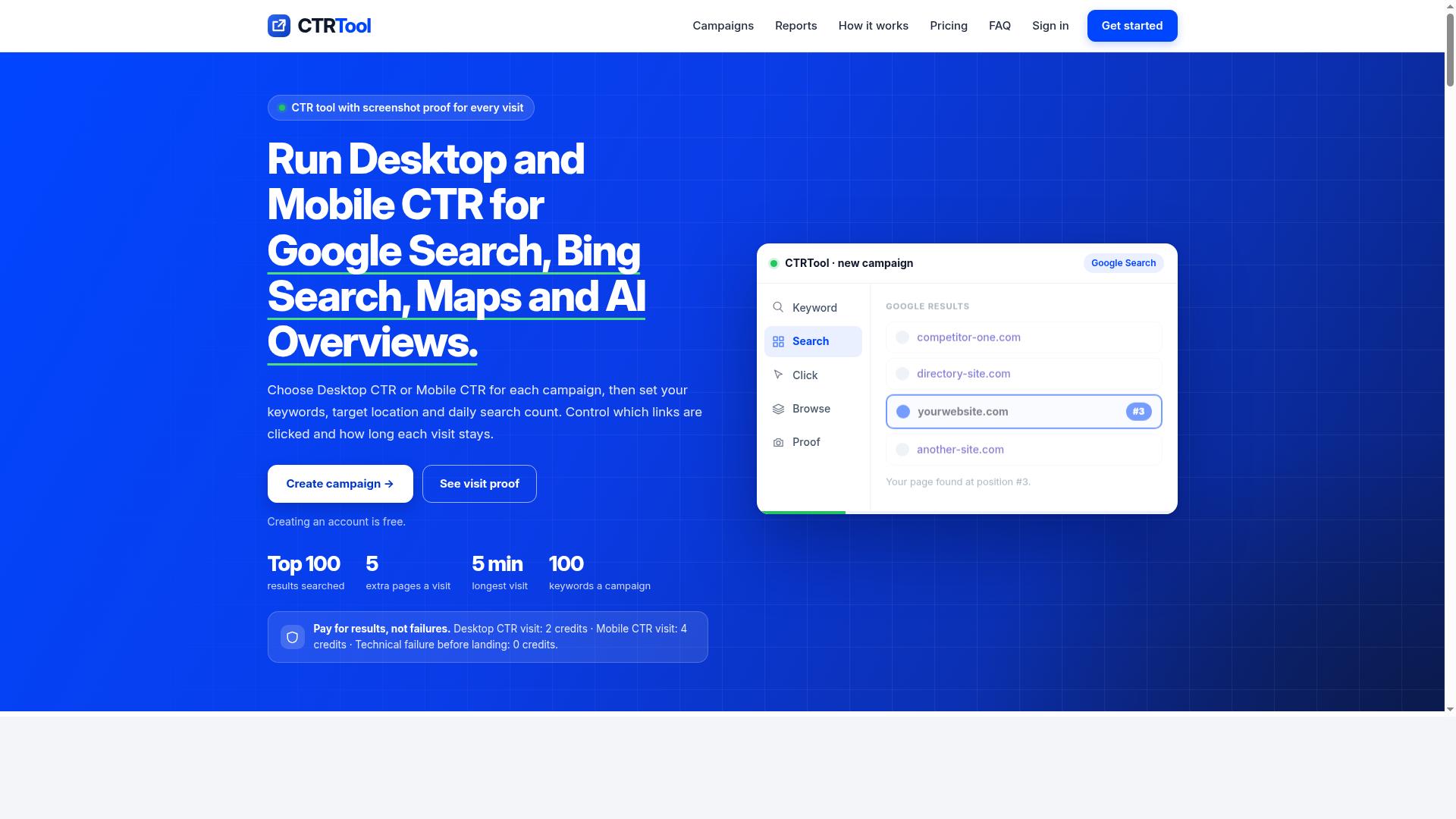
CTRTool is a SaaS CTR campaign tool that runs Desktop and Mobile CTR campaigns for Google Search, Bing Search, Maps and AI Overviews, with screenshot proof for every visit. It is built for SEO practitioners and agencies running click-through rate campaigns for their own sites or client properties.
Users choose Desktop CTR or Mobile CTR per campaign, then set keywords, target location and daily search count. They also control which links are clicked and how long each visit stays, giving fine-grained command over session duration and dwell time.
The tool covers four campaign surfaces:
- Google Search
- Bing Search
- Google Maps
- AI Overviews
One practical constraint matters for keyword targeting. The page must appear within the top 100 organic results for the chosen keyword and location before a campaign can work. That requirement keeps campaigns grounded in real, findable rankings rather than speculative placements.
CTRTool is also upfront about outcomes. The site states plainly that automated visits do not guarantee rankings, a candid note that separates it from tools promising guaranteed SERP movement. For agencies, the screenshot proof per visit adds a layer of accountability that is useful when reporting behavioral signals work to clients.
What Is Awesome Traffic Bot?
Awesome Traffic Bot is a desktop automation tool that simulates organic traffic to websites using configurable scripts, proxy rotation, and browser automation. It is commonly presented as a Windows-based bot that can send visitors to URLs through proxy lists, user-agent spoofing, and search-engine navigation flows. In practice, its focus is broader traffic generation rather than verified SERP clicks.
That distinction matters for anyone evaluating CTR manipulation tools. Awesome Traffic Bot is not typically positioned as a search-result CTR campaign platform with per-visit proof, so confirming that a specific keyword click actually landed is difficult. CTRTool, by contrast, is built around search click campaigns where each visit is tracked against a target keyword and page.
For readers weighing organic traffic simulation against ranking-focused click-through rate work, the two tools serve different goals. Awesome Traffic Bot leans toward general traffic volume, while a dedicated CTR campaign platform aims at measurable SERP behavior.
Features Compared
The feature comparison below focuses on three areas that determine whether a CTR campaign is measurable and controllable: surface coverage, visit proof, and campaign controls. These are the parts of CTR manipulation that separate a tool built for search engine optimization work from one built mainly for raw traffic volume.
This comparison relies on CTRTool's documented capabilities. Awesome Traffic Bot is described here in general terms only, since its public documentation does not detail equivalent per-surface campaign types, per-visit proof, or control options.
Readers weighing traffic bots against a dedicated CTR platform should pay close attention to what can be verified after a visit runs. A campaign that cannot show where a click came from, what page it landed on, and how a keyword moved over time is difficult to tie to any SERP ranking outcome.
Search, Maps and AI Overview Coverage
CTRTool supports four campaign surfaces, Google Search, Bing Search, Google Maps, and AI Overviews, while Awesome Traffic Bot is generally described as a general web-traffic bot rather than a surface-specific CTR platform. That difference matters because each surface behaves differently and needs its own campaign logic.
For Google Search CTR, a campaign searches a keyword and clicks the organic result. Users choose Desktop or Mobile, can target results within the Top 100, and can point visits to internal pages rather than only the homepage. Bing Search CTR follows the same model for Bing.
Google Maps CTR works differently. The campaign finds a business listing, checking up to 50 listings across roughly five pages, then clicks the listing's website link. AI Overview campaigns require a matching citation, so the tool looks for the site inside the overview and clicks its source link.
Awesome Traffic Bot, by contrast, is generally used for broad traffic generation. Its public materials do not document equivalent per-surface campaign types, so matching a campaign to a specific SERP element like an AI citation may require more manual setup or may not be supported at all.
Proof and Verification of Every Visit
CTRTool provides screenshot proof for every visit, with search and landing screenshots as separate proof images, plus full visit paths and keyword position tracking over time. This gives advertisers and SEO teams a record they can inspect after a campaign runs, rather than relying on aggregate traffic counts.
Position tracking covers more than standard search results. CTRTool reports Search positions, Maps listing order, and AI citation order, so movement on each surface can be followed across campaigns. Full visit paths also show which internal pages were reached during a session.
Awesome Traffic Bot is typically used alongside logs or dashboards, but per-visit screenshot proof is not publicly documented. That does not mean it offers no verification at all; it means buyers should confirm the specifics directly before relying on it for reporting.
For teams that need to show clients or stakeholders what a click actually did, documented proof per visit is a meaningful differentiator. It also supports the pay-for-results model CTRTool uses, where credits are not charged for technical failures before landing.
Campaign Control: Keywords, Location and Daily Search Count
CTRTool lets users set per-campaign controls including keywords, country and optional state/city targeting, Desktop or Mobile mode, and daily search counts. Campaigns support up to 100 keywords, and daily goals reset at 00:00 UTC with now, spread out, or gap timing across chosen days, hours, and time zone.
Location targeting can be a specific country with an optional state and city, or "Any country" to use a mix of supported locations. Search depth reaches up to 100 results, and campaigns can point to internal page URLs with chosen link text. Click order, scrolling time, and up to five additional pages per visit round out the setup.
Awesome Traffic Bot is generally configured through automation scripts with proxy and user-agent settings. Its exact control options and limits are not publicly documented in comparable detail, so teams should verify keyword, geo-targeting, and scheduling behavior directly.
For search engine optimization work, precise keyword and location control is what keeps behavioral signals aligned with real audience patterns. CTRTool's shared credit balance across all campaign types, websites, and keywords also simplifies budgeting, and unused credits roll over while subscribed.
Pricing Compared
CTRTool publishes monthly USD plans: Starter at $59/month for 2,000 credits (up to 1,000 Desktop CTR visits or 500 Mobile CTR visits) and Growth at $125/month for 5,000 credits (up to 2,500 Desktop or 1,250 Mobile visits). Two larger tiers, Scale and Agency, extend the same structure for heavier campaigns.
The key detail is that credits convert differently for Desktop and Mobile. A Desktop CTR visit costs 2 credits, while a Mobile CTR visit costs 4 credits. That single rule explains why every plan lists two different visit ceilings.
| Plan | Monthly Price | Credits | Up to Desktop Visits | Up to Mobile Visits |
|---|---|---|---|---|
| Starter | $59 | 2,000 | 1,000 | 500 |
| Growth (Recommended) | $125 | 5,000 | 2,500 | 1,250 |
| Scale | $399 | 20,000 | 10,000 | 5,000 |
| Agency | $699 | 40,000 | 20,000 | 10,000 |
Once you divide price by visits, the implied cost per visit becomes clear. Starter works out to about $0.059 per Desktop visit or $0.118 per Mobile visit. Growth drops slightly to about $0.05 per Desktop visit or $0.10 per Mobile visit, so the larger plan rewards volume with a better unit rate.
Two smaller credit rules matter for budgeting. A verified search without a match costs 1 credit, and a technical failure before landing costs 0 credits. Unused credits roll over while a subscription stays active, then expire when cancellation takes effect. Creating an account is free, and the site notes that prices rise 30% on November 15, so current rates are limited launch pricing.
Awesome Traffic Bot pricing is not covered here and should be checked on its official site. Any figure quoted elsewhere may be outdated or tied to a different license type.
For buyers weighing the two models, the split is straightforward. High-volume campaigns benefit from CTRTool's tiered credits and rollover, since unit costs fall as plans grow and unused balance is not lost mid-subscription. Proof-focused buyers who want to validate results on a small budget can start on Starter, confirm the traffic meets expectations, then scale up without changing tools.
Who Should Choose CTRTool
CTRTool fits SEO practitioners and agencies who need auditable CTR campaigns for their own or client websites across Google Search, Bing Search, Google Maps, and AI Overviews. The platform is built around campaign management, not just raw traffic volume, which matters when the work has to be defended to a client or a stakeholder.
Agencies often have to show proof of every visit, and CTRTool supports that need through screenshots of campaign activity. That record-keeping turns CTR manipulation from an invisible tactic into something a client can actually review. For teams managing multiple accounts, that paper trail is a practical advantage.
Per-campaign choice between Desktop and Mobile gives practitioners control over how each organic traffic simulation matches the device mix of the target keyword. Geo-targeting to specific countries or cities further aligns campaigns with the markets a site actually serves, rather than sending generic traffic from anywhere.
CTRTool also suits campaigns that must meet a top-100 ranking requirement, keeping activity focused on keywords that already sit within reach. Campaigns can point to internal pages as well, so deeper content gets attention instead of only the homepage. Combined with support for tier links, PBNs, and test properties, this makes CTRTool a reasonable fit for SEOs running structured, multi-layer campaigns where every visit needs to be traceable.
Who Should Choose Awesome Traffic Bot
Awesome Traffic Bot may suit users who want a general-purpose desktop traffic bot for broad URL visits rather than search-result CTR campaigns with per-visit proof. In practice, that means someone comfortable working with automation scripts, proxy lists, and Windows desktop software, and who mainly needs volume traffic pointed at pages outside a strict SERP click workflow.
This kind of user often cares more about raw visit counts than about tracing each click back to a specific keyword and search result. Script-based control appeals to people who like to build and adjust their own setups rather than work inside a guided campaign interface. If that describes your workflow, a general desktop bot can feel like a natural fit.
There is a trade-off worth naming. Broad URL visits do not, on their own, show that a real search click happened for a given keyword. Buyers who need auditable search CTR proof, meaning a clear record tying each visit to a keyword and result, should weigh CTRTool instead, since that kind of traceable campaign evidence sits at the center of a CTR manipulation workflow.
So the split comes down to intent. Choose a general traffic bot when the goal is loose, high-volume page visits and you are happy managing the plumbing yourself. Lean toward a dedicated CTR tool when the goal is keyword targeting with evidence you can review, because the two jobs ask for different kinds of tooling and different levels of accountability.
Final Verdict
For verifiable search CTR campaigns, CTRTool wins on proof and surface coverage; Awesome Traffic Bot remains a general traffic-automation option for users who do not need per-visit screenshots. The deciding factor is not raw traffic volume but whether you can show what happened on each visit. CTRTool is built around that evidence, and its documented surface list backs it up.
CTRTool's strengths sit in four areas. Every visit comes with screenshot proof, campaigns run full visit paths, position tracking is part of the picture, and coverage is documented for Google Search, Bing Search, Maps, and AI Overviews. For anyone running search engine optimization work where a client or manager asks "what did we actually buy," those four points carry real weight.
Awesome Traffic Bot stays a general traffic-automation option. It is often described as a tool for sending visitor traffic to pages, and that framing is fair as far as it goes. What it does not offer, based on publicly available information, is per-visit screenshot evidence or a documented set of named search surfaces. Readers who only need broad traffic simulation may find that acceptable.
Price is secondary here, but worth a brief note. CTRTool's Starter plan is listed at $59 per month, which sets a clear entry point for teams that want documented visits rather than anonymous hits. If budget is the only variable, compare that figure against whatever a general traffic bot quotes, and weigh it against the value of proof.
The either/or recommendation is straightforward:
- Choose CTRTool if your CTR manipulation work needs screenshot proof, full visit paths, position tracking, and coverage across Google Search, Bing Search, Maps, and AI Overviews.
- Choose Awesome Traffic Bot only if you want general traffic automation and do not need per-visit screenshots or a documented surface list.
For pre-purchase questions, CTRTool support is reachable at vaibhav@autoblogging.ai. Asking about coverage and proof before committing is a sensible final step, and it keeps the decision grounded in what each tool can actually show you.
Frequently Asked Questions
What is the main difference between CTRTool and Awesome Traffic Bot?
CTRTool is a CTR campaign tool built around screenshot proof for every visit, with full visit paths and keyword position tracking over time across Google Search, Bing Search, Google Maps and AI Overviews. Awesome Traffic Bot is positioned as an AI-powered CTR bot and, per its own sources, starts from $24.90/mo with a 1-day trial. The practical difference is that CTRTool focuses on verifiable, proof-backed campaigns for SEO practitioners and agencies, while Awesome Traffic Bot emphasises AI-driven traffic generation.
How does pricing compare between the two tools?
CTRTool uses monthly USD plans with pay-for-results credits: Starter at $59/month for 2,000 credits (up to 1,000 Desktop CTR visits or 500 Mobile CTR visits) and Growth at $125/month for 5,000 credits (up to 2,500 Desktop or 1,250 Mobile visits). Awesome Traffic Bot's researched pricing states "From $24.90/mo" with a 1-day trial, and no further plan details are confirmed. Because the two tools structure credits and features differently, compare plans against your actual campaign volume rather than headline price alone.
Which search platforms and campaign types does CTRTool support?
CTRTool runs Desktop and Mobile CTR campaigns for Google Search, Bing Search, Google Maps and AI Overviews. You choose Desktop CTR or Mobile CTR per campaign, set keywords and target a country with an optional state and city, or "Any country" for a mix of supported locations. Campaigns work with the top 100 organic results, Maps campaigns check up to 50 listings, and AI Overview campaigns require a matching source link.
Does CTRTool really provide proof for every visit?
Yes - screenshot proof for every visit is CTRTool's core selling point, with search and landing screenshots provided as separate proof images. Campaigns also include full visit paths and keyword position tracking over time, including Maps listing order and AI citation order. This makes it straightforward to verify results for your own sites or client websites.
Can I try CTRTool before committing to a plan?
CTRTool is offered through monthly plans (Starter at $59/month and Growth at $125/month) with pay-for-results credits, so you can start on the smaller plan and scale up as your campaigns grow. The verified brand facts do not list a separate free plan or trial length, so check the official site at ctrtool.com for the current sign-up options. Awesome Traffic Bot, by comparison, advertises a 1-day trial.
Who is each tool best suited for?
CTRTool is aimed at SEO practitioners and agencies running CTR campaigns for their own or client websites across Google Search, Bing Search, Google Maps and AI Overviews, with guidance on using tier links, PBNs and test properties. Awesome Traffic Bot markets itself as an AI-powered CTR bot with OpenAI ChatGPT 4.0 integrated into its AI mode, which may appeal to users prioritising AI-driven automation. If verifiable proof and multi-platform campaign control matter most, CTRTool is built specifically around those needs.